 Nexus One
Post everywhere from one content command center.
Connect your social profiles, plan your calendar, upload videos and photos, write captions, schedule content, and publish across platforms like TikTok, Meta, X, LinkedIn, and YouTube from one connected workspace.
Plan, caption, schedule, and publish your content without jumping between every platform.
Run your social content without running around.
Social Media brings your content planning and publishing into Nexus One. Instead of opening every platform separately, your team can plan posts, upload media, write captions, schedule content, and manage connected profiles from one workspace.
Whether you are posting videos, photos, announcements, product content, brand updates, or campaign content, Nexus One gives your team one place to organize the work.
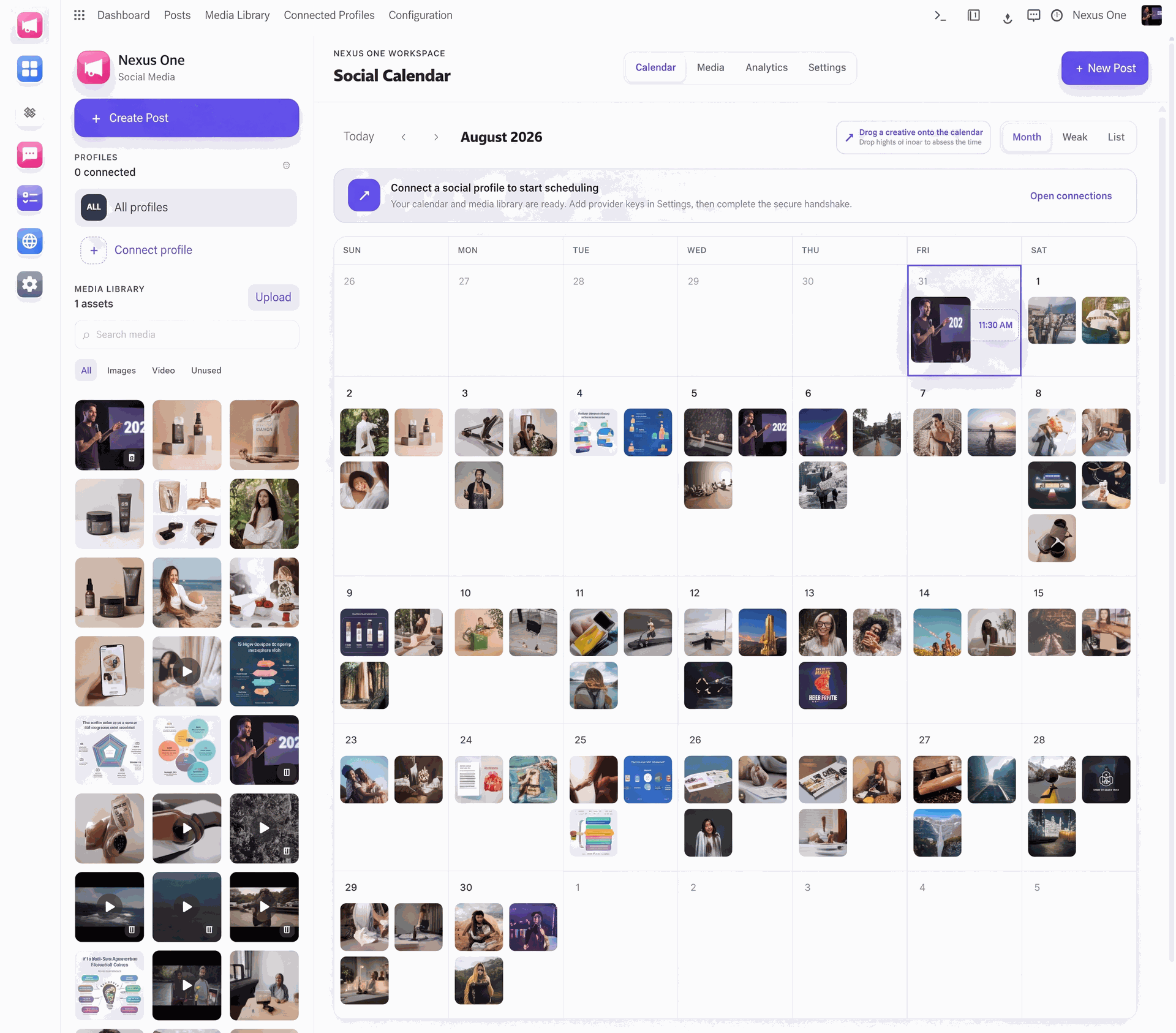
Your whole content calendar, in one view.
See every scheduled post, upload media, and connect profiles without leaving the calendar.
Social Media Tools Built for Organized Growth.
Connected to the Rest of Your Business.
Social Media does not live alone. It works with the rest of Nexus One.
Because consistency is hard when your content is scattered.
Most businesses know they need to post more. The hard part is keeping everything organized.
Photos are in one place. Videos are somewhere else. Captions are in a note. The posting schedule is in someone’s head. Different platforms need different formats. And nobody knows what is actually ready to publish.
Nexus One Social Media helps bring the content workflow together so your team can plan, schedule, and publish with more control.
Built for businesses that need to stay visible.
Connect, create, schedule, and publish.
See Your Whole Content Plan Before It Goes Live.
A content calendar helps your business move from random posting to organized publishing. You can see what is planned, what needs a caption, what is waiting for approval, what is scheduled, and what has already gone live. That means your team can stay consistent without guessing what should be posted next.
Create Once. Adapt for Every Platform.
Every platform has its own rhythm. TikTok wants short-form video. Instagram needs reels, photos, and captions. LinkedIn wants professional content. X moves fast. YouTube needs video structure. Nexus One helps your team manage content for multiple channels from one place so each platform gets the right version of the message.
Platform posting features, supported media types, account permissions, scheduling limits, and analytics access may depend on each platform’s API, account type, region, and business setup.
Upload the Content. Keep the Campaign Moving.
Your best content should not get lost in camera rolls, desktop folders, group chats, or random drives. Nexus One Social Media gives your team a place to organize photos, videos, captions, and post details so every piece of content has a clear next step.
Write the Caption Where the Post Actually Lives.
Captions are part of the post, not an afterthought buried in a notes app. With Nexus One, your team can write captions, add calls-to-action, organize hashtags, and prepare platform-specific descriptions in the same place where the post is scheduled.
Keep the Brand Consistent Before Anything Goes Live.
When more than one person touches social media, approvals matter. Nexus One helps your team know what is still being drafted, what needs review, what is approved, and what is scheduled. That makes it easier to keep the brand consistent and avoid last-minute posting chaos.
Connect Your Profiles With the Right Permissions and Controls.
Social publishing depends on platform rules, account permissions, API access, and business settings. Nexus One helps organize the content workflow, but each platform controls what can be posted, scheduled, connected, or measured through its system.
Posting, scheduling, profile connections, media support, analytics, and approval behavior may depend on each platform’s API, account type, region, permissions, and business configuration.
Your content gets easier to manage when everything lives in one place.
Social media gets messy fast. One person has the video. Someone else wrote the caption. The owner wants to approve it. The post needs to go to five platforms. And by the time everyone finds the files, the moment has passed.
Nexus One Social Media helps your team plan ahead, stay organized, and publish with more confidence.
Your content calendar becomes visible. Your captions stay attached to the right posts. Your media stays connected to the campaign. Your team knows what is ready and what needs work.
Plan the content once. Publish it everywhere it belongs.
Enable Nexus One Social Media to connect profiles, organize your calendar, upload videos and photos, write captions, schedule campaigns, and manage social publishing from one connected workspace.
Platform connections, scheduling, media support, and publishing features depend on account permissions, APIs, region, and business configuration.